 KORNIZA
01 / Gallery presentationColour portrait

The art of
framing
photography.
Your photographs. Beautifully presented. Create gallery-style compositions with considered mattes, distinctive frames, subtle bevels, and your handwritten signature.
The application
Made to be seen.
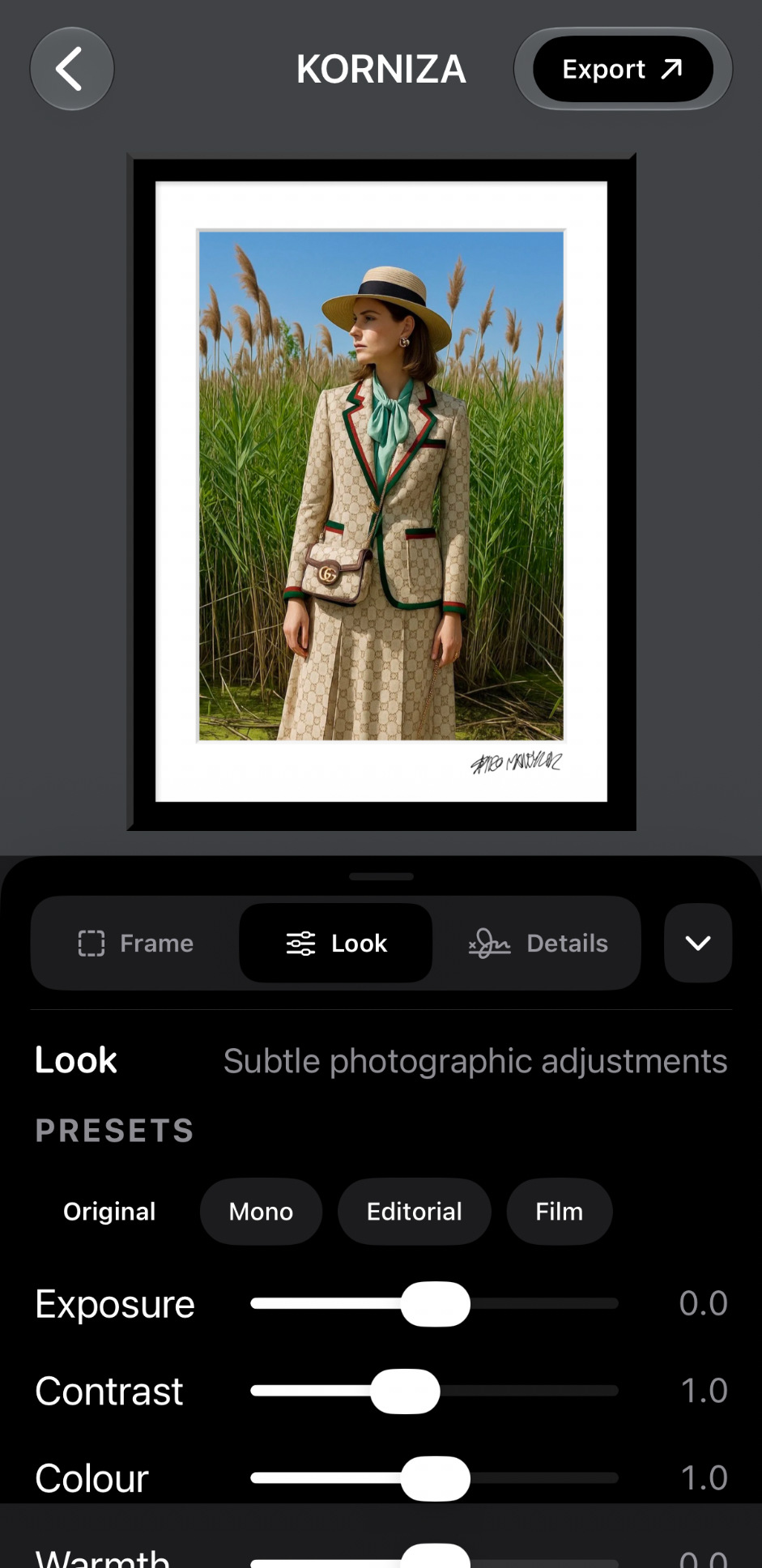
Real KORNIZA screens, photographed from the working iPhone app. No simulated interfaces, no decorative mockups.
02 / Frame stylesFive options
03 / Custom mattesMargin control
04 / Handwritten signatureYour mark
05 / Photographic looksMonochrome
06 / Full-resolution exportJPEG · PNG · TIFF
Considered details
The photograph comes first.
KORNIZA is designed for the final presentation of a photograph, not a crowded collection of editing gimmicks.
Five distinct frames.
Choose Classic, Slim Bevel, Stepped Wood, Beaded Wood, or Antique Gold. Each style remembers its own selected colour within a photograph.
Proportion is everything.
Adjust all matte margins together or tune the top, bottom, left, and right independently. Choose a separate matte colour and subtle bevel.
Make it yours.
Import your real handwritten signature from Photos once. Enable it when needed, position it on the matte, and lock it into place.
The finishing touch.
Explore Original, Mono, Editorial, and Film looks, or fine-tune exposure, contrast, colour and warmth.
Ready for presentation.
Work with familiar photographic ratios and preserve the photograph's composition inside a custom frame and matte.
Keep the detail.
Save full-resolution compositions as JPEG, PNG, or TIFF directly to Photos. The output includes KORNIZA software metadata; your original photograph is not overwritten.
Simple by designOne image.
One image.
Every detail.
Import a photo, build its framing, sign it if you choose, and save the finished composition. No subscription or account is needed.

Help
Support.
If you have a question, discover a problem, or want to suggest a future improvement, please get in touch.
Please include your iPhone model, iOS version, and KORNIZA version if reporting a problem. You don't need to send personal photographs.
How do I import a photograph?
Open Gallery, then use the Photos picker to select a photograph. KORNIZA creates a separate project and preserves the original in your Photos library.
How do I change the matte and frame?
Open Frame. Use the canvas settings to choose a ratio, then Borders for the matte colour, individual margins, outer frame, style and optional bevel controls.
How do I add my handwritten signature?
Prepare a photo of your handwritten signature, then import it from Photos in Details. You can enable it for individual photographs, drag it into the matte, adjust its size, and lock it in place.
Does KORNIZA change my original photograph?
No. KORNIZA works in its own project and exports a new composition. The image you imported remains in your Photos library.
How do I export a finished image?
Tap Export and select JPEG, PNG, or TIFF. JPEG offers a quality adjustment. Tap Save to Photos, and allow add-only photo access when iOS requests it.
Are my photographs uploaded or shared?
Not by KORNIZA 1.0. The app's photo-framing tools work locally on your iPhone. Exporting to Photos uses Apple's local photo-library APIs; your device and iCloud Photos settings may determine whether your personal library synchronizes elsewhere.
Can I use KORNIZA on an iPad?
KORNIZA 1.0 is designed for iPhone with iOS 17 or later. A native iPad layout is not part of this release.
Legal
Privacy Policy.
Last updated November 12, 2026
KORNIZA is a photo-framing application published by Spiro Mandylor ("we", "us"). This policy describes the handling of information in KORNIZA 1.0 for iPhone and distinguishes the app from the website you are reading.
Information collected by the app
KORNIZA 1.0 does not collect personal data from the app or send photographs or signatures to a server controlled by us. The app has no accounts, advertising SDKs, third-party analytics SDKs, or tracking features.
Photographs and signatures
When you select a photograph using Apple's Photos picker, a copy is imported into KORNIZA's local app storage to create a project. Handwritten signatures you import from Photos are processed and saved locally on your device so you can reuse them. KORNIZA accesses the items you choose and does not upload this content to us.
Saving to Photos
KORNIZA requests permission to add completed images to your Photos library. Exported photographs are saved as new files, and the original photograph is not overwritten. The resulting file may include a Software metadata field identifying KORNIZA 1.0. Your Photos and iCloud Photos settings are governed by Apple.
Local storage and deletion
Projects, local imported images, preferences and saved signature data are kept within the application's storage on your device. You can remove projects from the app. Uninstalling the app generally removes its local app data, but does not remove photographs previously saved into your Photos library.
Website visits
This page uses no analytics scripts, advertising pixels, or tracking cookies. As with most websites, the hosting provider and your browser may process standard technical connection information to deliver and secure the page. These website connection records are separate from KORNIZA's app privacy disclosure.
Children
KORNIZA does not knowingly collect personal information from children or anyone else through the app.
Changes and contact
If KORNIZA's data practices change, we will update this policy and applicable App Store privacy information. For privacy questions, contact smandylor@gmail.com.
Legal
Terms of Use.
Last updated November 12, 2026
These Terms apply to KORNIZA ("the app"), published by Spiro Mandylor ("we", "us"). Apple's standard Licensed Application End User License Agreement also applies. If there is a conflict, mandatory consumer-protection laws and applicable Apple terms take precedence.
1. Licence and permitted use
KORNIZA is licensed, not sold. Your purchase gives you the right to use the app for your personal or professional photo-framing work, subject to Apple's licence terms. Do not copy, distribute, reverse-engineer, or resell the app except where applicable law permits it.
2. Your photographs remain yours
You retain the rights to your photographs, imported signatures and resulting compositions that you own. KORNIZA does not acquire ownership of images processed in the app. You are responsible for having appropriate rights or permission for any photographs, designs or other materials you import or distribute.
3. Your responsibility for exported work
Review your final compositions before sharing, publishing, selling, or printing them. Output appearance may depend on image resolution, device settings, colour management, file format and the services or printers you use.
4. Availability and updates
We may update KORNIZA to improve functionality or compatibility. Features and device requirements may change with future versions. App purchases, refunds, billing and distribution are managed by Apple under its applicable terms.
5. No guarantee
To the extent permitted by law, KORNIZA is provided on an "as is" and "as available" basis without warranties of uninterrupted operation or fitness for a particular purpose. Nothing in these terms limits consumer rights that cannot legally be excluded.
6. Limitation of liability
To the extent permitted by applicable law, we are not responsible for indirect or consequential loss arising from use of the app. Where liability cannot be excluded, it will be limited only to the extent permitted by applicable law.
7. Intellectual property
The KORNIZA name, application design, software and other materials provided with the app are owned by their respective rights holders. This does not affect ownership of your imported or exported photographs.
8. Governing law
These terms are governed by the laws of Ontario and the applicable federal laws of Canada, subject to any mandatory consumer rights in your place of residence.
9. Contact
For support or legal questions, email smandylor@gmail.com.